
The most common question a recruiter asks us is not what it can do. It is "show me what it actually looks like on my phone."
Fair question. A recruiting desk is a fast, messy thing, and nobody wants another dashboard to log into or another tool to learn. So here is the plain version, written for a recruiter who is not remotely technical: what an AI recruiting agent actually is, what it looks like in your chat, and how you would use it day to day.
Most of your desk is already built
A recruiter came to us recently who was about to relocate and rebuild his desk from scratch in a new market. He wanted to be AI-native from day one, and before he would commit he sent a plain list of everything he wanted it to do. No jargon, just his actual job.
Here is his list, and where each item stood the day he asked.
| What he asked for | Is it built? |
|---|---|
| A morning feed of new job ads in his niche | Yes. An overnight scan runs every night and the ranked roles are waiting by morning. |
| A daily digest of which companies are hiring | Yes. The same overnight scan, plus an end-of-day desk report. |
| Live roles with hiring-manager contacts, ready to call | Yes. It builds a live research dossier on each role and plugs into his CRM. |
| A market map of hiring managers, CFOs and CEOs, saved to a database | Yes. It maps the market and writes the contacts straight into his CRM. |
| Drafted outreach emails and candidate specs | Yes. It writes them in his voice, ready to send. |
| Automated campaigns with follow-ups and a nudge to call | Mostly. It drafts the sequences, tracks the pipeline, and pings him when it is time to call. |
| A monthly newsletter to his contacts | Yes. It drafts the newsletter from his talent map. |
Nearly the whole list was already running before he signed, because it is the same set of jobs on almost every desk. The one or two things that were specific to how he works were not a problem either. You can ask the agent to build a new skill for you, just by describing what you want in a message. Or we build it with you. Either way you are never stuck waiting on a roadmap.
Nearly everything a recruiter needs is built in already, because it is the same work on almost every desk. Anything specific to how you work, you can ask the agent to build itself, or we build it with you. You are not buying a fixed tool, you are getting a teammate that grows with your desk.
Slack or Telegram, on your phone or your laptop
You reach it wherever you already work. It runs in Slack and in Telegram, on your phone or your computer, whichever you prefer. Same agent, same skills, you just message it like a colleague. Prefer not to use a chat tool at all? There is a clean web app too. Nothing to install.
This is what it looks like in Slack. Here it is setting a brand-new recruiter up: it introduces itself and asks the few things it needs to run your desk, in plain English.
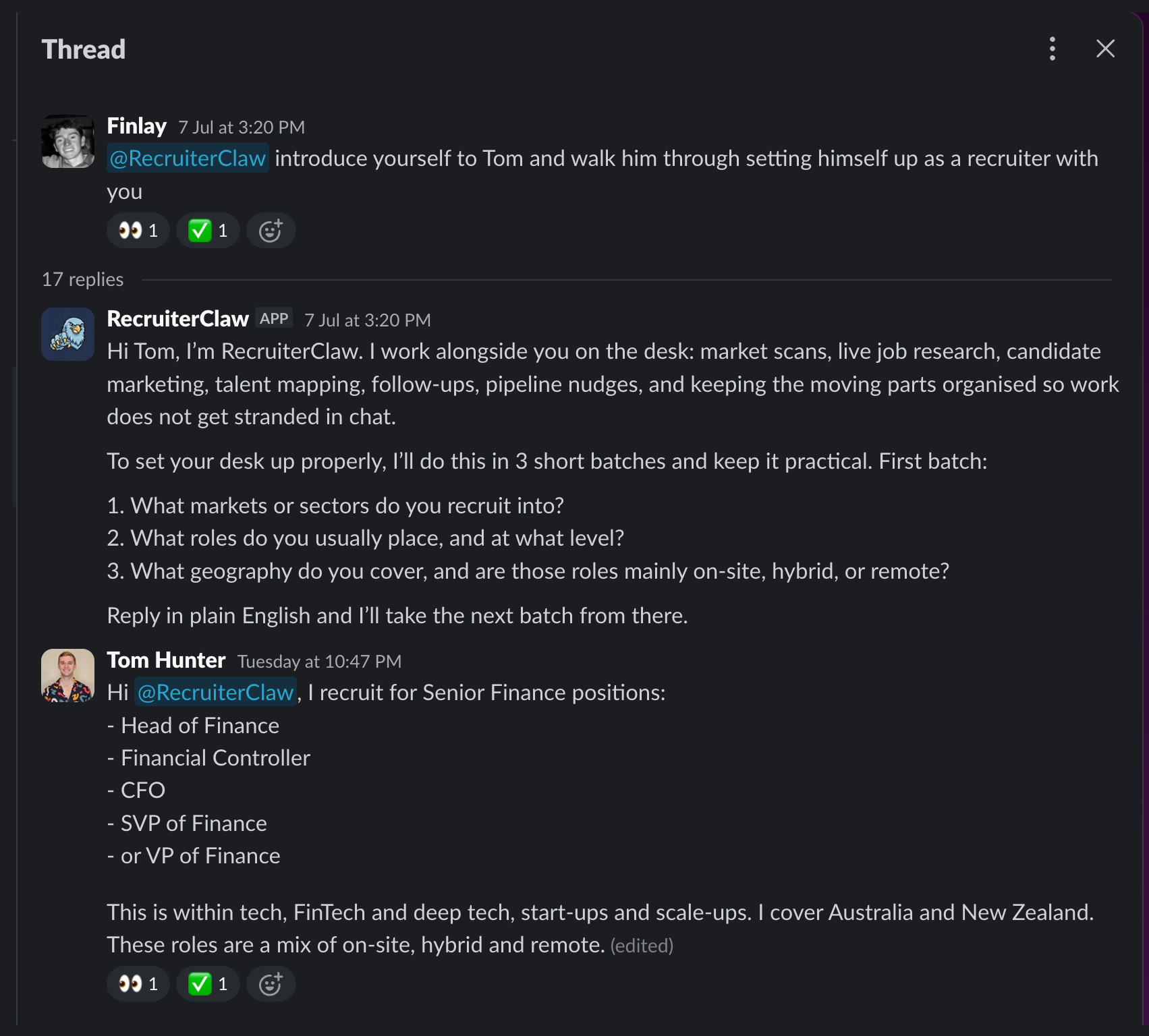 In Slack, on a laptop. It onboards you by asking a few plain questions. No forms, no software to learn.
And this is what it looks like in Telegram. These two shots are from Tom Hunter's real desk at Story Recruitment. Tom named his instance TomBot. Candidate names, client companies and contact details are blurred, because this is his live book, but nothing else is staged.
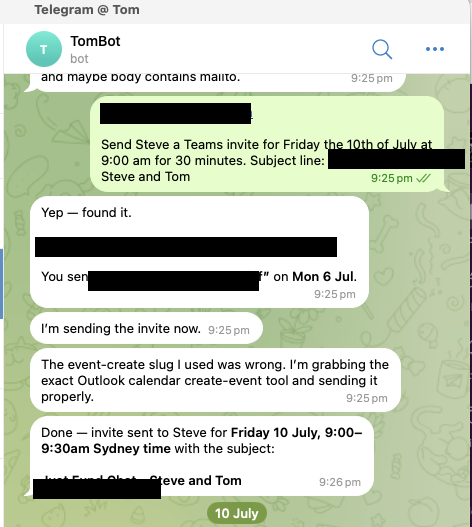 In Telegram, on his phone. Tom asks it to book a meeting; it finds the contact and sends the Teams invite.
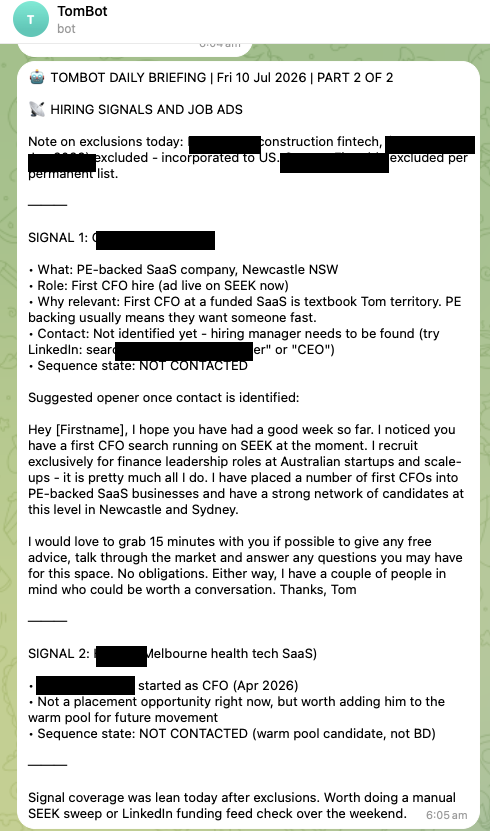 Also Telegram: the overnight brief it ran while he slept, before he opened his laptop. Company and candidate names blurred.
The skills it comes with
Every recruiter's agent ships with these built in from day one, each one grounded in your niche:
- Overnight market scan. Fresh roles in your niche every morning, scored and ranked before you wake up.
- Live job dossier. Paste in any job ad and it researches the company: the likely hiring manager, how warm the lead is, and an opener that references something real. You are first to call, not the fifth recruiter with the same generic pitch.
- Candidate to market. Drop in a CV and it finds the right companies, drops the wrong ones, and drafts the outreach in your voice. You read it and send.
- Talent mapping. Name a patch and it maps the hiring managers, CFOs and CEOs in it, ranks them, and writes them straight into your CRM. No exporting, no copy-paste.
- Meeting to follow-ups. Connect your notetaker and one call becomes the client email, the job ad and the outreach drafts at once, all in your voice. You approve, you do not write.
- Pipeline nudges. It reminds you before candidates, clients or deals go cold, not after.
- End-of-day desk report. What moved, what is stuck, and what it picks up tomorrow, in your chat each evening.
- Conversational setup. No forms and no consultant. It interviews you in plain English and sets itself up.
And it does not stop there. If you want something specific to how you work, you can ask it to build a new skill just by describing it, or we build it with you.
You set it up just by talking to it
You do not need to be technical to run this. That is the whole point.
We do the wiring once: connecting your CRM, email, calendar and notetaker takes us about an hour, on our side. After that, you set your own desk up just by talking to it. It asks you a few plain questions, your niche, your roles, your patch, the way you write, and sets itself up from your answers. No forms, no software, nobody driving the keyboard for you.
Tom Hunter did his entire desk this way in about ten minutes.
And it grows with you. If there is something you want it to do that is not there yet, you can ask it to build that skill, just by describing what you want. Prefer to hand that to us? We will build it with you. You are never left waiting to unlock your own tool.
The core is done for you and running in days. Setting up your desk is a ten-minute chat, not a project. And when you want something new, you can ask the agent to build it, or we build it with you. It keeps growing with your desk.
What it costs
$5,000 to set up, then $200 a month for hosting, updates and keeping it running. That is the lot: your own private instance on its own server, trained on your niche and the way you write, with everything above connected to the tools you already use.
For context, a junior resourcer costs around $60,000 a year and works one desk, one shift. This runs every play, on every channel, around the clock. If you ever cancel, the brain we built with you stays yours.
See it on your own desk
Want the full walkthrough? The RecruiterClaw page lays out every play with live examples you can click through. If you would rather just watch it run on your own desk, book a discovery call and we will show you the real thing, with your niche loaded in.
Common questions
What does an AI recruiting agent actually do?
It runs the repeatable parts of a recruiting desk for you: an overnight scan of new roles in your niche, live research on any job or company, taking a candidate to market, mapping decision-makers into your CRM, and turning any client or candidate call into the follow-ups, in your voice. You talk to it in Telegram, Slack or a web app, and it also works in the background without being asked.
Do I need to be technical to use it?
No. You set it up by chatting to it in plain English, which takes about ten minutes, and you use it by messaging it like a colleague. There are no forms and no software to learn. If you ever want it to do something new, you just ask it to build that skill, or we build it with you.
Does it work with my CRM and tools?
Yes. It connects to the CRM, email, calendar and notetaker you already use, and we set those up for you. If you use a tool it does not support yet, we can add it, or you can ask it to build a skill for it. Its research runs on live web search, not guesswork.
What does it cost?
$5,000 to set up and $200 a month for hosting, updates and maintenance. There is no lock-in and you can cancel the monthly plan any time.


