The time you spend on email, trending to zero.
An AI agent reads, sorts, and prioritises every email, then drafts the replies that need you, in your own voice. You wake up to a clean inbox and answers ready to send.
Re: Q3 board pack, final numbers before Friday
Invoice INV-2043 is due tomorrow
Coffee next week to talk through the pilot?
Ten shifts shaping AI for operators in 2026
Contract redlines attached for your review
New meeting booked: Thursday 2:00pm
Forty-seven unread overnight, read and sorted to zero before your first coffee. The few that need you are already drafted.
Your inbox quietly became a second job.
Email is the work that sits on top of the work. It is not hard, it is just relentless, and it scales with how much you have on. The fix is not a smarter filter or another folder. It is an agent that does the triage for you.
It eats your week
Reading, sorting, and replying quietly swallows hours every week. None of it is the work you were hired to do.
The one that mattered is buried
The reply that needed you today sits three screens down, under newsletters, receipts, and reply-all threads.
It never switches off
Every notification is a context switch. You are never fully on the inbox, and never fully off it either.
Your data never leaves your business.
Everything we build runs on your own servers and your own accounts. We never store your data, you own all of the IP, and if we disappeared tomorrow it would all keep running. It is model-agnostic too: Claude today, whatever wins tomorrow.
It works the inbox the way you would. Just faster, and overnight.
Four moves, run on every email that lands: read it, sort it, draft the reply if it needs one, file the rest. You step in only where your judgement is actually needed.
Reads and understands every email
The agent reads each message the way you would: who it is from, what they are actually asking, and how it fits the rest of your world. Not keyword matching, real understanding.
Categorises and prioritises
Each email is sorted and ranked. What needs a reply rises to the top, what is informational is tagged, and the noise is set aside. You see the important few, not the overwhelming many.
Drafts the replies that need you
For anything that warrants a response, a full reply is written in your voice, learned from your real sent mail. It is ready in the draft, waiting for you to glance over and send.
Files the rest away
Dealt-with mail is filed into the right folders automatically, so the inbox stays clean. Nothing is deleted; everything is exactly where you would have put it, found in a second when you need it.
Replies that sound like you, because they learned from you.
- Learned from your real sent mail, so it matches your tone, length, and the way you actually write.
- Replies arrive fully drafted in your inbox, not as a blank page or a generic template.
- Edit a draft and it learns. The more you use it, the more it sounds exactly like you.
Tom Wallace
Coffee next week to talk through the pilot?
Tom, great timing, I’d genuinely love to. Tuesday or Thursday both work for me after 10. Happy to come to you, or there’s a good spot near the office. I’ll bring the pilot numbers so we can get into the detail.
Cheers,
It never sends. It never deletes. Every draft waits for you.
Handing your inbox to an agent only works if you trust it not to do anything irreversible. So it doesn’t. The agent does the heavy lifting; the decisions that matter stay with you.
It never sends on its own
Every reply is a draft. Nothing leaves your inbox until you read it and press send yourself. No surprises in anyone's inbox, ever.
It never deletes
Mail is filed, never destroyed. The agent tidies your inbox by moving things into folders, so nothing is ever lost.
You approve everything
Triage, drafts, and filing are all reviewable. You can steer what it touches and what it leaves alone. The judgement stays yours.
Read-only where it counts. The agent proposes; you dispose.
Inbox time trends to zero. The work still gets done.
The hours that used to disappear into reading and sorting trend toward nothing. That time goes back to the actual work.
Every email read, categorised, and filed overnight. You open a clean inbox with drafts already waiting, not a backlog.
Every reply and every action waits for a human. The clean inbox is automatic; the decisions stay yours.
Your inbox, your rules.
Categories, draft rules, digests, and filing: every part of the triage is tuned to the way your team works, all from one simple dashboard.
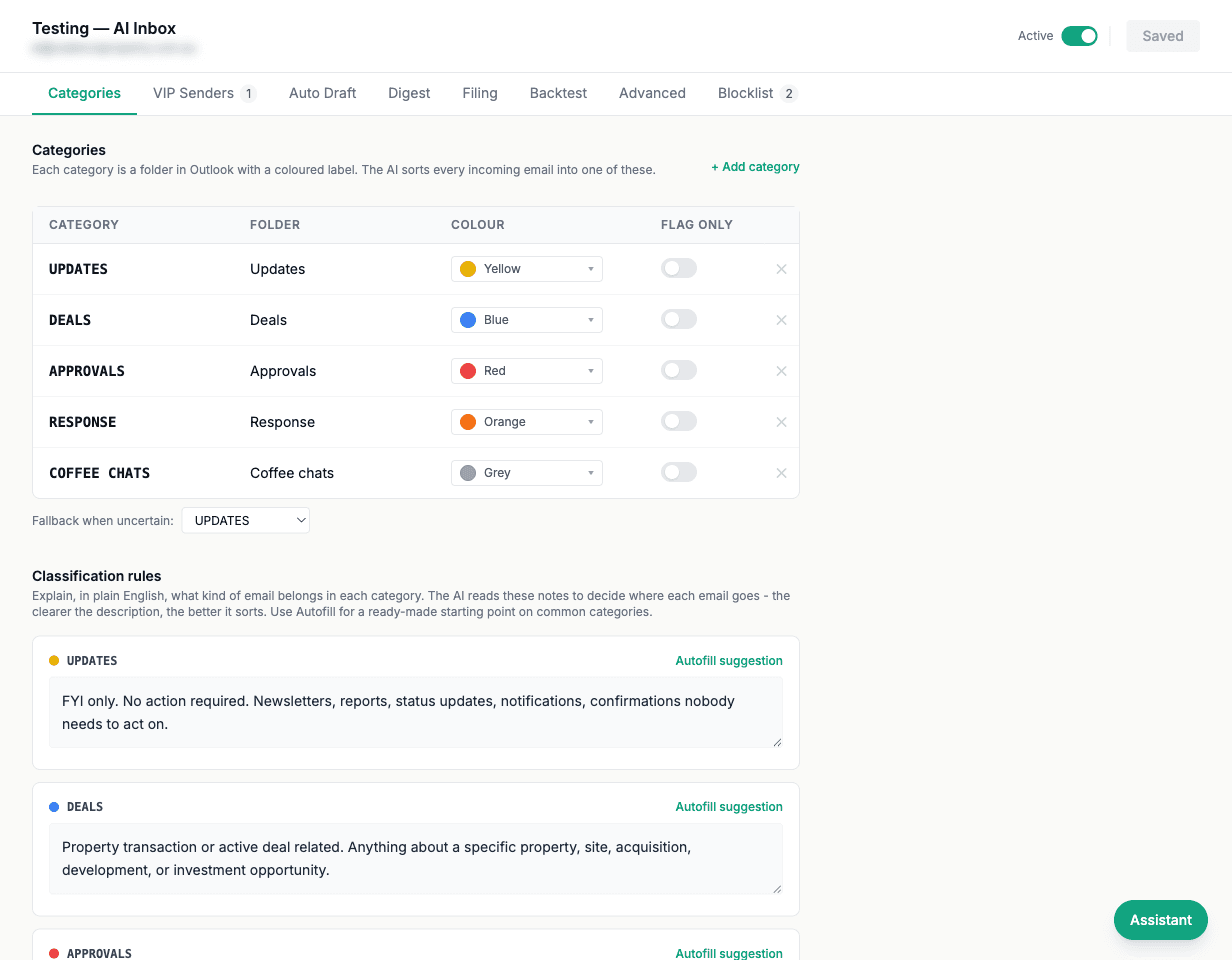
Tuned to your world. Steered by your team.
This is not a plugin you install and hope. We build it around your inbox, your senders, and your priorities, then hand your team a config surface to keep it pointed at what matters.
Tuned to your world
Built per client and tuned to your senders, your priorities, and the folders you already use. It fits how you work, not a generic ruleset.
A config UI to steer it
Your team gets a simple control surface to adjust priorities, voice, and filing rules, and to keep the agent pointed at what matters as things change.
Sits on your Company AI Brain
Because it draws on the same single source of truth as the rest of your stack, it answers with real context, not just the text of one email.
See the Company AI BrainThe things people ask first.
Will it ever send or delete an email without me?
No. This is the core promise. The agent drafts, sorts, and files, but it never sends and never deletes on its own. Every reply waits as a draft until you read it and press send, and dealt-with mail is filed into folders, never destroyed. You stay in control of anything that leaves your inbox.
How does it learn to write in my voice?
It learns from your real sent mail: your tone, your length, the phrases you actually use. Drafts come back sounding like you wrote them, not like a template. When you edit a draft before sending, it takes that as a signal and gets closer to your voice over time.
Which inbox does it work with?
It is built per client and connects to the email you already run, whether that is Gmail, Google Workspace, or Microsoft 365. Nothing migrates and nothing changes for the people emailing you. The agent simply works your existing inbox in the background.
What about sensitive or confidential email?
Access is scoped and agreed with you up front. You decide what the agent triages and what it leaves untouched, and sensitive categories can be excluded entirely. Because it is tuned to your world, the boundaries are set to your rules, not ours.
Can I turn parts of it off?
Yes. Through the config UI your team can dial each piece up or down: have it only sort and file, only draft for certain senders, or run the full triage. You can start conservative and widen its remit as trust builds.
Wake up to a sorted inbox.
A clean inbox, replies drafted in your voice, and the hours you used to lose to email handed back. Built around your world, steered by your team, and never sending or deleting without you.
Typical build: $5,000 – $25,000 depending on scope, then maintenance at about $1,000 per month.
30-minute call. No lock-in. Aussie-based team.